
Turn scanned forms into system-ready records, automatically
Voxket OCR reads your scanned PDF forms with AI vision, synthesizes every page into one structured record in your target schema, and links every field back to the exact spot on the source image, so a reviewer approves in minutes instead of re-typing for hours.
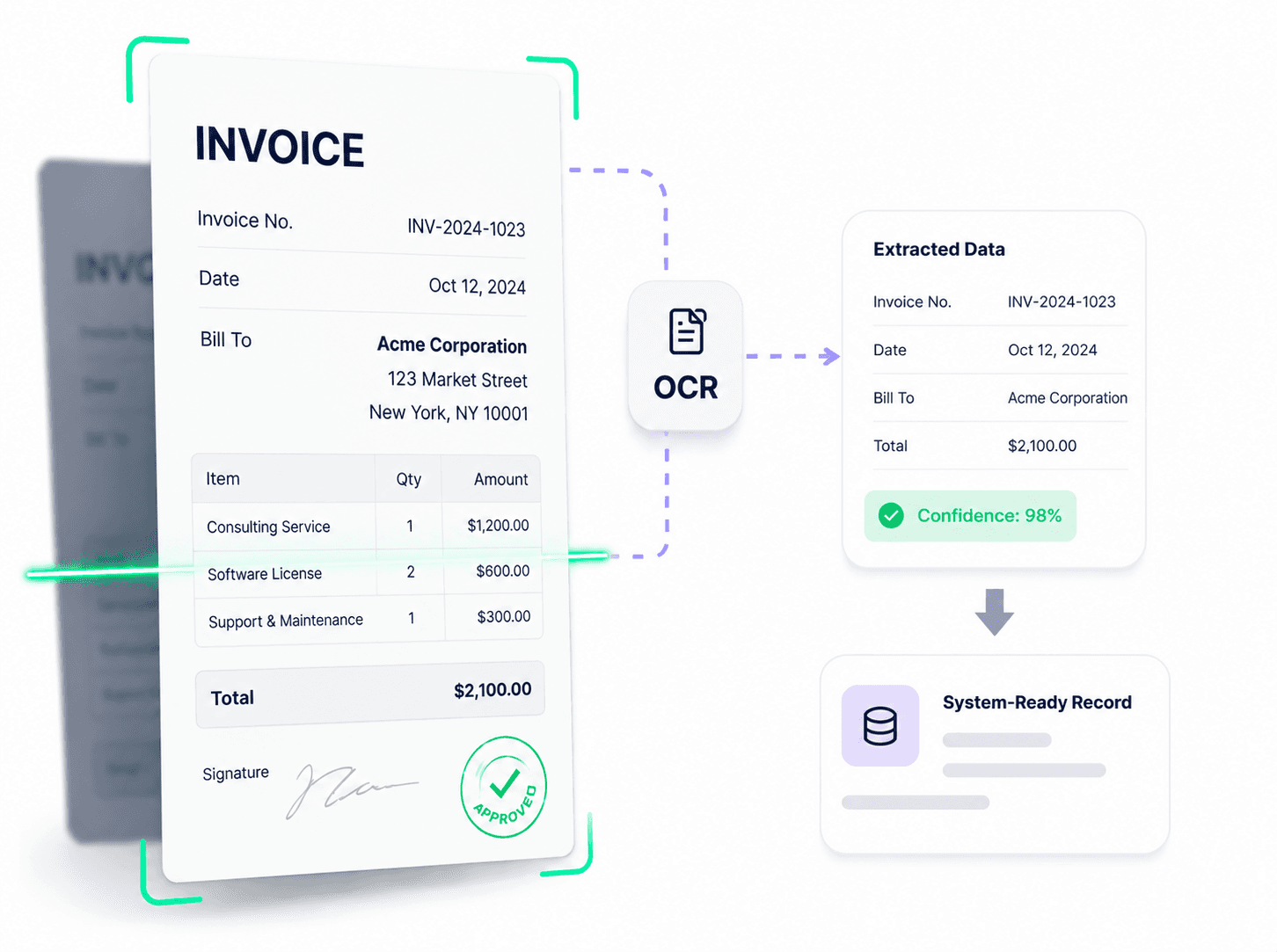
AI document extraction that lands in your system of record
Voxket OCR turns batches of scanned PDF forms into structured, schema-validated records. It reads every page with vision AI, synthesizes the pages into one record per document, scores and source-links every field, then routes it through human review and approval before exporting to Excel or your system of record.
Most extraction tools stop at pulling text and key-value pairs off the page. Voxket OCR reads with a vision LLM (no template to maintain), synthesizes multi-page packets into one record in your schema, and keeps a human in the loop with provenance and a full audit trail.
Re-typing forms into your system of record is slow, error-prone, and expensive
Onboarding customers, outlets, distributors, or vendors from paper and PDF means someone re-types dozens of fields per document, a single outlet-verification form can carry 95-plus, into a master system like SAP.
- Labor that scales linearly with volume, batch after batch.
- Errors in the most important data you own: a wrong GSTIN, PAN, or bank detail in master data.
- Slow time-to-onboard while new outlets or accounts sit in a data-entry queue.
- No auditability: no clean trail from a value back to the box on the original form.
- Template OCR that breaks on rotated scans, checkboxes, and multi-page packets.
Vision extraction, provenance, and human sign-off in one pipeline
AI-vision OCR (Google Gemini)
Reads printed and scanned PDF forms as images and returns structured fields, including checkboxes and signatures, each with a bounding box and confidence score. No per-layout template to build.
Batch processing in parallel
Upload many PDFs at once; each is rendered to page images and read in parallel with document-level concurrency, so you digitize a whole stack in one run.
LLM accumulation & synthesis
An accumulator step merges every page of a document into one record shaped to your target schema, keeping each field's source page, so you get one clean canonical record, not fragments.
Field-level provenance
Click any extracted field to see it highlighted with a bounding box on the exact source page, next to its confidence score, so reviewers verify a value in seconds and trust the output.
Confidence scores everywhere
Every field carries a 0–100 confidence value, color-coded high/medium/low, so reviewer attention goes to the handful of fields that actually need a second look.
Human review, edit & approval
Reviewers edit any field inline, approve, and lock the record. Every manual edit is logged (field, old value, new value, timestamp), so accuracy and sign-off happen before data reaches your system.
Schema-validated export
Extraction targets your exact field schema with strict validation, and exports to Excel (single or a whole batch with automatic column discovery), ready for import, not raw text you still have to map.
API-driven & configurable
Upload, process, review, approve, and export over a REST API. Both the OCR agent and the accumulator agent (prompts, models, target fields) are configurable without a code change.
A seven-stage pipeline, from upload to import-ready
- 01
Upload
Drag and drop a batch of PDF forms; parsing starts in the background.
- 02
Render
Each PDF is rasterized to high-quality page images, one per page.
- 03
Read
AI vision extracts text, checkboxes, and signatures per page, in parallel, with a box and confidence per field.
- 04
Accumulate
An LLM synthesizes all pages into one record shaped to your target schema, tracking each field's source.
- 05
Validate
The record is validated against your schema so shape and required fields are correct.
- 06
Review & approve
A reviewer inspects source-linked fields, edits where needed (audited), and approves to lock the record.
- 07
Export
Export the approved record, or a whole batch, to Excel, ready for import into your system of record.
Any high-volume document to structured-record workflow
Questions teams ask about OCR
What documents can Voxket OCR read?
Scanned and printed PDF forms. It reads text fields, checkboxes (checked/unchecked), and signatures, and handles multi-page documents.
Is this template-based OCR?
No. Voxket OCR uses a vision LLM (Google Gemini) that reads the page as an image, so there's no per-layout template to build or maintain. That's what lets it handle varied, real-world forms.
How accurate is it?
Every field carries a confidence score and a link to its exact source region, and a human reviews and approves before the record is finalized, so accuracy is model extraction plus fast, targeted human verification.
What does the output look like?
A single structured record per document, shaped to your target schema, exportable to Excel (single document or a whole batch with automatic column discovery) and available via API.
Can it match my system's fields, like SAP customer-master?
Yes. Extraction and synthesis target your exact schema. The proven deployment maps outlet forms to a 95-plus column SAP customer-master layout.
How does field-level provenance work?
Each extracted field stores the source page and a bounding box. In the review screen, click a field and it's highlighted on the exact spot of the source image, next to its confidence score.
Is there a human review step?
Yes. Reviewers edit fields inline, then approve, which locks the record. Every manual edit is captured in an audit log, and only approved records can be exported.
Can I tune it for a new form type?
Yes. The per-page OCR agent and the cross-page accumulator agent, including their prompts, models, and target fields, are configurable without a code change.
Ready to put an AI workforce on your frontline?
Deploy voice, chat, and video agents that work 24/7, act in your systems, and hand off to your team when it counts. Build your first agent in minutes.
White-glove onboarding for teams · Talk to a human, not a form.