
Run your entire event on one AI-powered platform
Voxket Event runs the whole lifecycle in one place: AI generates your landing page, registration forms, and badges; Paddle handles ticketing; QR badges check attendees in per session; and email and AI voice-call campaigns fill the room. Then ask an AI assistant what your data means.
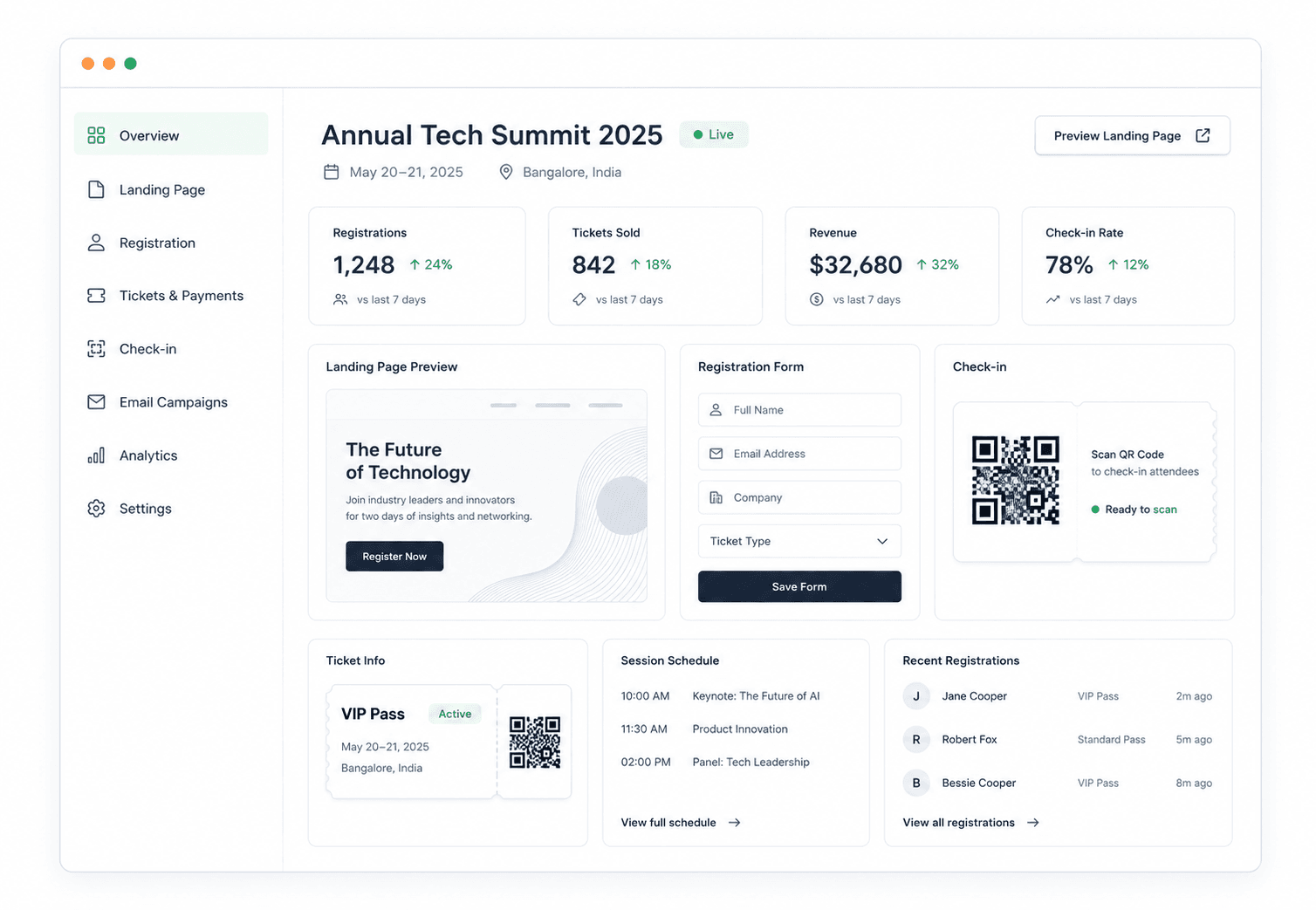
An AI event platform for conferences, workshops, webinars, and meetups
Create an event, generate an AI landing page and registration forms, sell tickets with Paddle, design AI badges with per-session QR check-in, run email and AI voice-call campaigns, and ask an AI assistant about your data, all from one multi-tenant console.
Most event tools make you build everything by hand and stop at a confirmation email. Voxket Event generates the work (pages, forms, badges, schedules) and acts on your list across every channel, including a real AI phone call.
Running an event means renting six tools and gluing them together
- “Setting up the landing page and registration form eats the first week before we've sold a ticket.”
- “Our data is scattered across five tools, so I never have one clean number for who's coming.”
- “Badge design and check-in is a fire drill every single event.”
- “We email the list and hope. Half never open it, and no-shows kill the room.”
- “When the CEO asks how registration is tracking, I have to go build a spreadsheet.”
- “Enterprise platforms are overkill and quote-only; the cheap ones can't do half of what we need.”
One platform generates the setup and runs the day
Event lifecycle management
Create, publish, and duplicate events with multi-track agendas, sessions, speakers, capacity, and deadlines. AI can draft the whole agenda from a prompt.
AI landing-page builder
Describe your event and Voxket streams a complete, on-brand landing page section by section, hero to FAQ. Refine visually or in code, then publish or embed anywhere.
AI registration forms
Generate and edit registration forms by chatting with AI, per registration type, with rich field types and progressive save that captures a lead even before they finish.
Ticketing & payments (Paddle)
Sell tickets with Paddle checkout, tiered and early-bird pricing, add-on upsells, and signed webhooks that auto-confirm on payment. Staff can record cash and offline payments too.
AI badges + per-session QR check-in
AI designs print-ready badges from your brand or a reference image. Scan a QR at the door and each session, with live session-level access control and entitlement gating.
Multi-channel campaigns
Run email campaigns and human-like AI outbound voice calls from one attendee list, with transcripts and a Hot/Warm/Cold score per call, and automation hooks on lifecycle events.
AI analytics + data chat
A real dashboard (funnel, sources, geography, revenue) plus an AI assistant that answers questions grounded only in your event's data, in plain language.
Attendee & organizer management
Import and export registrations, approval flows, a full registration timeline, and hierarchical organizer roles (RBAC) with per-role session access and badges. Multi-tenant by design.
From a prompt to a full room
- 01
Create the event
Set the type, schedule, venue or virtual link, capacity, and deadlines.
- 02
Generate page & forms
AI streams the landing page and registration forms; refine visually or in code.
- 03
Set pricing & promote
Configure ticket tiers and Paddle payments, then launch email and AI voice campaigns with auto-follow-up hooks.
- 04
Run & analyze
Design AI badges, run per-session QR check-in on a live board, then read the dashboards and ask the AI assistant what to do next.
From a single workshop to a multi-track conference
Questions organizers ask about Event
What kinds of events does Voxket Event support?
Conferences, workshops, seminars, webinars, and meetups, in-person, virtual, or hybrid, free or paid, single-session or multi-track.
What makes it an AI event platform?
AI generates your landing page, registration forms, badge design, and agenda from a prompt, runs outbound AI voice-call campaigns, and answers questions about your event data in plain language. The AI does setup and outreach, not just chat.
Can I take payments and sell tickets?
Yes. Ticketing runs on Paddle with checkout overlay and hosted fallback, tiered and early-bird pricing, optional add-ons, and signed webhooks that auto-confirm on payment. Staff can also record cash or bank-transfer payments for the box office.
Do I need a designer for the landing page or badges?
No. AI generates both, the landing page as an editable page spec and the badge as a print-ready design (it can even work from a reference image you upload). You refine visually; you don't start from blank.
How does check-in work?
Each attendee gets a QR badge. Scan it at the door and at each session with a phone camera; the attendee flips to checked-in in real time, and access is enforced per session based on their type, role, and any grants or revocations you set.
Can it really call attendees?
Yes. Voxket Event can place human-like AI outbound voice calls to confirm, remind, or follow up, returning a transcript, evaluation, and a Hot/Warm/Cold score per call, running on Voxket's voice platform.
Can I embed the registration page on my own website?
Yes. Public event pages are served at their own URL and embed in any site via iframe with automatic resize, so they sit natively inside your own domain.
Can I ask questions about my event data?
Yes. The analytics assistant answers in plain language, grounded only in your event's data, including registration pacing, sources, geography, revenue, and demographics, and keeps saved threads.
Ready to put an AI workforce on your frontline?
Deploy voice, chat, and video agents that work 24/7, act in your systems, and hand off to your team when it counts. Build your first agent in minutes.
White-glove onboarding for teams · Talk to a human, not a form.